
As of v15.0, Butler SOS serves as the backend for Audit.qs - a comprehensive auditing solution for both Qlik Sense Enterprise on Windows and Qlik Sense Cloud.
Who Is Audit.qs For?
Audit.qs is designed for enterprises that need precision visibility into how their Qlik Sense environments are actually used. It answers the question: "Who looked at what, when?"
Target Audience
| Role | What You Get |
|---|---|
| Qlik Sense Administrators | Deploy the extension, configure audit event delivery, and ensure enterprise-wide coverage across apps and sheets. |
| Governance & Compliance Teams | Forensic-grade audit trails showing exactly which users viewed which data, with optional screenshot evidence of what was on screen. |
| App Developers | Add the extension to sheets and select which objects to monitor — no code changes to existing apps required. |
How It Works
Audit.qs runs as a lightweight Qlik Sense extension inside the user's browser. It monitors selected chart objects on each sheet and sends structured audit events to Butler SOS, which routes them to your preferred storage destination.
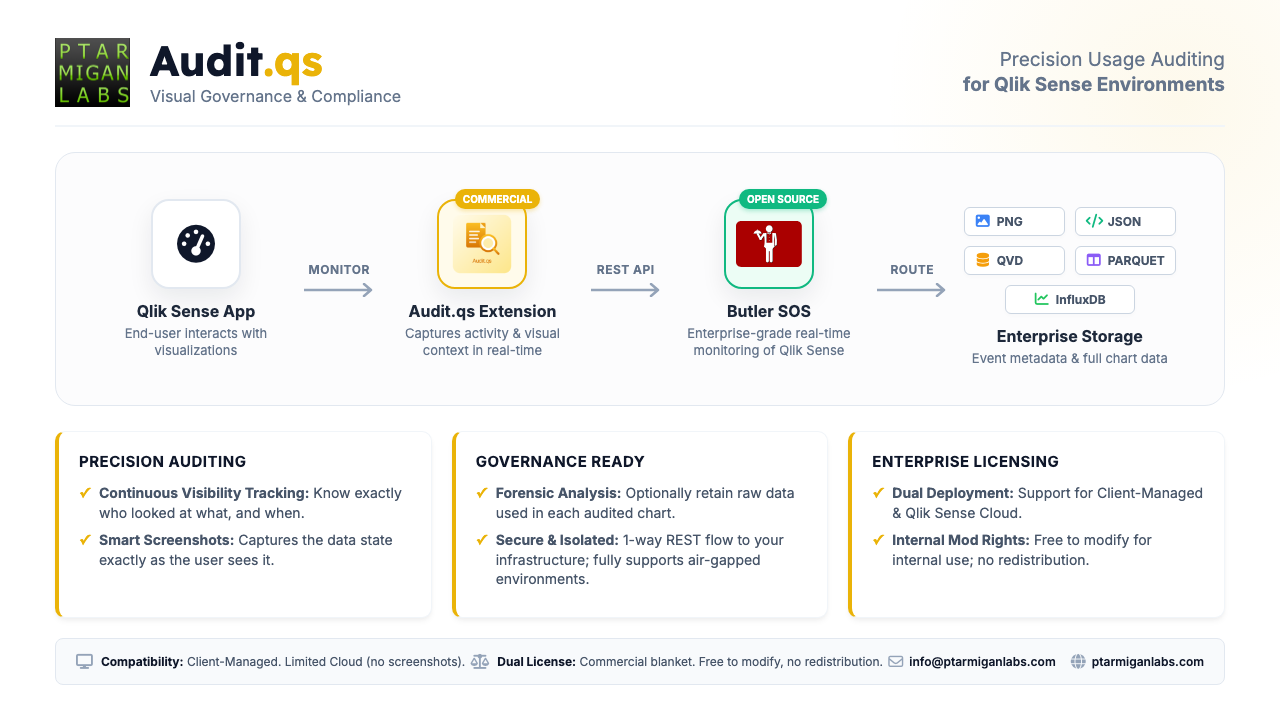
Audit.qs data flow from Qlik Sense to enterprise storage
The flow is simple: the extension captures activity in real-time, Butler SOS processes and stores it, and you choose where the data lands — whether that's PNG screenshots, JSON files, QVD exports, or Parquet for your data lake.
Why Enterprises Need It
Traditional Qlik Sense logging tells you that someone opened an app. Audit.qs tells you what they actually saw: which charts were visible, what selections were made, how long they looked at each object, and — optionally — captures the exact data state as a screenshot.
This matters for:
- Compliance: Prove who accessed sensitive data and when
- Forensic Analysis: Reconstruct exactly what a user saw during an investigation
- Usage Intelligence: Understand which dashboards and charts deliver real value
- Security Auditing: Detect unusual access patterns or unauthorized data exposure
Key Capabilities
- Continuous Visibility Tracking: Know exactly who looked at what, and when
- Smart Screenshots: Captures the data state exactly as the user sees it
- Forensic Analysis: Optionally retain raw data used in each audited chart
- Secure & Isolated: One-way REST flow to your infrastructure; fully supports air-gapped environments
- Dual Deployment: Support for Client-Managed and Qlik Sense Cloud
- Internal Mod Rights: Free to modify for internal use; no redistribution
Compatibility
- Client-Managed: Full feature set including screenshots
- Qlik Sense Cloud: Limited support (no screenshots)
Licensing
Audit.qs uses a commercial blanket license. You're free to modify the extension for internal use, but redistribution is not permitted.
Coming Soon: Audit.qs is currently being finalized. Contact Ptarmigan Labs for more information about availability and pricing.
Overview
Audit.qs consists of a Qlik Sense extension that monitors user activity within Sense apps. When users interact with charts, make selections, or navigate between sheets, those events are captured and sent to Butler SOS for storage and analysis.
What is Captured
Audit.qs captures detailed user activity:
- Sheet Navigation: Which sheets users visit and how long they stay
- Selections: What data selections users make
- Visualizations: What visualizations users view
- Viewing Duration: How long users look at specific objects
Storage Destinations
Audit data can be stored in:
- InfluxDB: For real-time analysis in Grafana
- QVD Files: For direct loading into Qlik Sense
- Parquet Files: For long-term storage and data lake integration
- Screenshots: Image files downloaded by Butler SOS when Audit.qs emits screenshot events
If you enable screenshot downloads, Butler SOS can fetch image URLs emitted by Audit.qs and store the resulting files server-side. For configuration and runtime details, see Audit Screenshots and Screenshot Downloads.